Project Groups and Datasets
Project Groups and Datasets⚓︎
This section describes the project group list, group summaries, dataset cards, and name-based search in the TDEI Data Viewer.
For a list of all guides on the TCAT Wiki, refer to the Guides List.
Project Group List⚓︎
The home page lists open project groups that have publicly available datasets. Each card displays the group name, status, and location, with an Explore Project control that opens the group view.
Project Group View⚓︎
A project group page identifies the group and provides summary values for its released datasets and feedback response time. It contains a Search Datasets list alongside the Dataset Map.
Dataset Cards⚓︎
Each dataset card displays its name, version, and upload date and time. The available controls are:
| Control | Effect |
|---|---|
| Zoom To Dataset Boundary | Centers and zooms the group map to the selected dataset boundary |
| Explore | Opens the dataset-specific map view |
Dataset Search⚓︎
The Search Datasets field filters the group's dataset list by dataset name. The visible result count and map view update with the search. Entering part of a dataset name narrows the list to matching results.
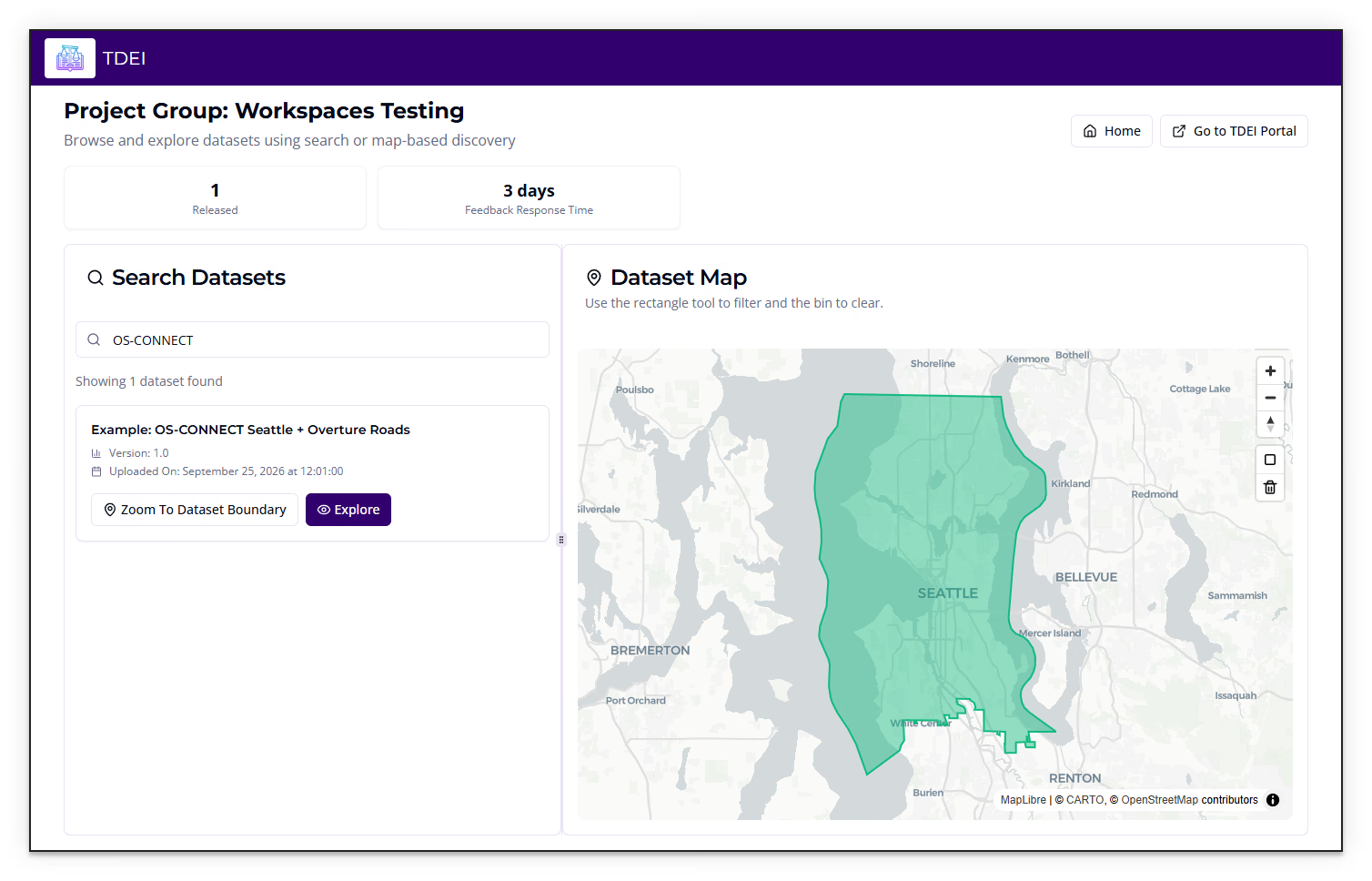
Home returns to the project group list. Go to TDEI Portal opens the separate TDEI Portal site.
Previous: TDEI Data Viewer User Manual | Next: Maps and Dataset Features